Today marked another historical event in the history of Apple, creators of the revolutionary iPhone . There are a lot of milestones being celebrated by Apple today, I'll go through each milestone and announcement in this blog post, so sit back, relax and enjoy what I think is the beginning of another chapter in Apple's storied history. The first significant detail in today's special event is that the event is the first to be held at the Steve Jobs Theater in Cupertino, California . Here are some pictures of the Steve Jobs Theater which is located in the new Apple "Spaceship" headquarters. Apple will be moving to this new headquarters by the end of this year. The new Apple headquarters is powered by 100% renewable energy. The event started with a recording of one of Steve Jobs' speeches to the Apple team which goes: "There's lots of ways to be, as a person, and some people express their deep appreciation in different ways. But one ...
Popular posts from this blog
How to Cut Out Part of an Image in GIMP
There are many uses of cutting out portions of an image, one of them is to remove the background and probably replacing it with a plain background color, others want to add the cut out to another image, the needs vary and the list goes on. I'll be showing you the exact steps on cutting out a specific portion of an image and saving it to another image file . This is using the freeware photo editor GIMP . So here is the original image, and let's say I would like to cut out the car from the whole image: Open the file in GIMP, click on Layer-Transparency-Add Alpha Channel. Now, select the Lasso or Free Select Tool . You can now trace the shape you want to cut out, return to the starting point of your tracing to complete the selection. Click on Select-Invert then press CTRL-X to cut out the selected area. This is how the cut out area will look: You can now use the cut out image however you want. Related articles Photographer of the Day...
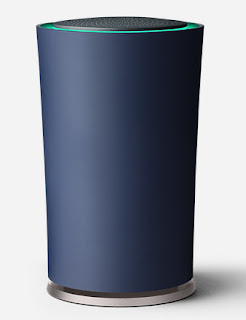
Google Launches Its Own Wi-Fi Router - OnHub
Google has just launched its own wi-fi router called the Google OnHub. The new router promises to make wi-fi speeds faster and future proof , with support for 802.11a/b/g/n/ac wi-fi and future technologies like Bluetooth , Smart Ready, Weave and 802.15.4, according to Google, the OnHub will be able to support future Smart Devices . OnHub will be able to have fast wi-fi up to 1900 Mbps by supporting 2.4Ghz and 5Ghz frequencies. One of the advantages of the OnHub is that it will automatically search for the fastest wi-fi connection. Also, the OnHub is capable of prioritizing a device so that device will have a faster wi-fi connection, this is good for streaming videos, if you want to watch video without buffering. The OnHub will automatically update its firmware and can do the update without interrupting the wi-fi connection. What's different in the design of the OnHub? There are 13 antennas (six 2.4GHz antennas, six 5GHz antennas, and a congest...
Comments
Post a Comment