Posts

Another iPad Challenger, This Time from RIM

Image
Image via CrunchBase RIM , makers of the most popular business phone Blackberry is the latest competitor to the growing list of challengers to Apple 's iPad tablet device.  RIM could show their tablet device to the public as soon as next week at a developer's conference in San Francisco .   Rumors say that the device could be called the Black pad.  Earlier this month, Samsung also released their iPad competitor, the Samsung Galaxy Tab.  Other companies who have released or plan to release their own tablet PCs are Dell and HP . Related articles by Zemanta Tablet landscape to get crowded; 8 models by Q1 2011 (zdnet.com) RIM BlackPad Tablet to be Launched Next Week? (taragana.com) 4 Ways a RIM Tablet Could Smoke the iPad, Galaxy Tab (pcworld.com) RIM's BlackPad Tablet: Five Questions About the Rumored Device (pcworld.com)

Nokia N8 Smart Phone

Image
Image via Wikipedia The Nokia N8 smart phone is again targeted to compete with Apple 's iPhone .  The Nokia N8 is a to uch screen smart phone with a sliding QWERTY keyboard .  The N8 comes with a 12MP Carl Zeiss lens camera.  The Nokia N8 is all about the future, it is now equipped with an HDMI connector so you can view videos and pictures in high definition when you connect the N8 to your home theater system, it also has built in web TV so you can watch from any wi-fi hotspot.  As a phone targeted at the iPhone, the Nokia N8 has also been equipped with multiple home screens (maximum of 3).  The Nokia N8 isn't only for fun, it is equipped with GPS, Nokia boasts of voice navigation for over 70 countries worldwide.  For the technical specs, the Nokia N8 comes in a 3.5 inch AMOLED touch screen display, talk time of about 720 minutes and standby time of about 390 hours.  Internal memory is at 16 GB and can be expanded to 32GB with it's micro sd card...

Nokia E7-00 Smart Phone

Image
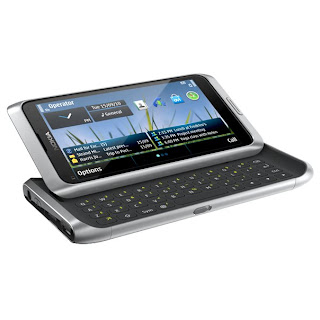
Nokia has been very quiet on the smart phone scene lately, but they hope that would change with their release of their latest E7-00 smart phone.  Let's take a look at the E7 in more detail. First the hardware.  The E7 comes with a 4 inch AMOLED capacitive touch screen which is capable of displaying 16 million colors.  The E7 also comes equipped with an accelerometer.  This is a tri-band phone so you don't need to worry if you are a frequent traveler.  For connectivity, the Nokia E7 has built in Wi-Fi and bluetooth and also has a mini-usb connection.  For the battery power, talk time is a maximum of 540 minutes or 9 hours and standby time up to 430 hours! Now on the applications side.  The E7 runs on the Symbian 3 OS for Nokia, Java, Flash lite, Mail for Exchange,   IBM Lotus Notes Traveler, Quick Office Dynamic Premium, Adobe PDF reader, Ovi Maps with free GPS navigation and the standard PC suite application for your computer. The ...

Still Another Android Phone from Motorola

Image
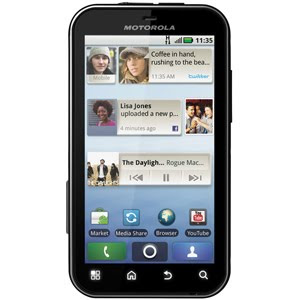
Motorola has released another new Android based phone to add to it's growing line up of very attractive Android phones.  Last Monday, Motorola released the Motorola Defy android phone.  The Defy is the upgrade to the Motorola i1.  Motorola has made this a very rugged phone in that it has scratch resistant 3.7 inch WVGA touch screen, add to that, the handset is actually water resistant and dust proof.  The phone comes with Android 2.1 and Motoblur.  Other features are the 5 megapixel camera with flash.  Motorola also included the CrystalTalk Plus technology which they say will make calls clearer.  If you're a Flash fan, you will love the web browser installed on the Defy, it is Flash Lite enabled.  Motorola has not released pricing or release date yet.

Stream Videos in Your House to iPod, iPhone and iPad

Image
I just learned about this new cool application that lets you stream video from your PC to your iPhone, iPod Touch or iPad. The software is called Air Video from a company called In Method (http://inmethod.com). Setup is simple and easy, you can start streaming and watching on your iPod in less than 5 minutes. First step is to download an install the Air video server on your computer, this is a free download. Once the server is installed, you can add folders you can view by right clicking on the Air Video server icon on your task bar and add folders. Next step is to download and install the Air Video application on your iPod/iPhone/iPad. Once installed, you can run the Air Video App, select the server, select the folder and select the video you want to watch. For some videos, converting is necessary, but the cool thing about Air video is that it can stream and convert at the same time, so while your watching the movie, Air video is actually converting it. While I was watching m...

iOS 4.1 Now Available for iPod Touch and iPhone

Image
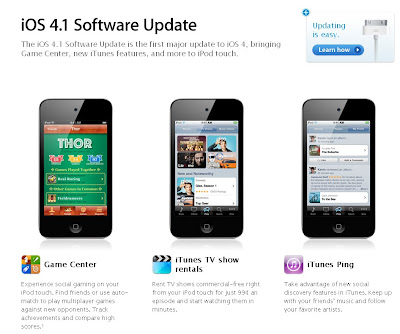
As announced by Apple during its September 1 event, the iOS 4.1 has been released for the iPod touch and iPhone. iPad owners will have to wait for the iPad version to be released late this year. 3 Noteworthy applications have been added, Game Center, TV tunes rental and iTunes Ping. Unfortunately, all of these 3 apps are not available for us Pinoys :( Game Center - is like a social network focused on gaming, this can be run straight from the iPod touch/iPhone. Through this service, you will be able to search for friends to play with in multiplayer mode or use the auto-match play to play against other players you don't know. You will also be able to track high scores and achievements on a leaderboard, depending on the game you are playing. iTunes TV Show Rentals - Apple has switched from selling TV shows to just renting. Each rental will cost 99 cents (about P45) per episode. This price has to go down if Apple expects to compete with other existing services who offer purchasing...

How to Get Motherboard/Mainboard and PC Specs

Image
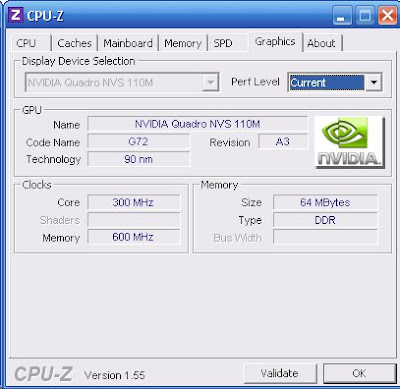
Did you ever have to re-format your PC or laptop? Did you have a problem looking for the model of your mainboard/motherboard so you can download the correct drivers? You're in luck, there is a free software download available to do just this, get all the specs of your PC or laptop. The software is called CPU-Z, the author is a group called CPUID, their website is at www.cpuid.com. With this program, you can gather all the relevant information of your current hardware like mother board/ main board model, Processor, Memory installed and graphics card. Here is the sample I run on my Dell laptop: From the information you get out of CPU-Z you can now download the corresponding drivers to run your machine.